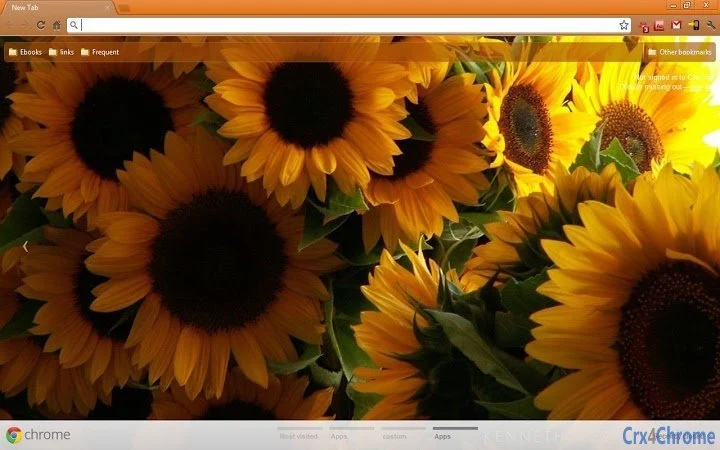

Free Chrome Themes for Personalized Browsing
Overview
The software is a collection of browser themes designed to personalize the appearance of Google Chrome across multiple platforms. It allows users to customize their browsing environment with visually distinct themes, offering a fresh and unique look for their desktop interface. The primary purpose is aesthetic enhancement, enabling individuals to tailor their browser’s visual style to match personal preferences or creative expression.
Target users include casual internet users, students, and professionals who value visual customization and enjoy a personalized digital workspace. The software is particularly useful for those who use Google Chrome as their primary browser and want to refresh their interface without altering functionality. Real-world usage scenarios involve applying a theme to make browsing more enjoyable, align with a specific mood or brand, or simply stand out with a unique desktop background.
Developed by an independent creator with a history of sharing browser themes through personal blogs and social media, the software reflects a niche focus on visual design and user experience. While the developer’s broader background is not detailed, their public presence on platforms like Facebook and Google+ suggests an active engagement with design communities.
Key Features & Capabilities
- Custom Browser Themes – Offers a selection of visually distinct themes that change the appearance of Google Chrome’s interface, including background colors, icons, and layout elements.
- Platform Compatibility – Designed to work with Google Chrome on Windows, Mac, and Linux systems, allowing consistent customization across different operating environments.
- Easy Installation – Themes can be applied directly through Chrome’s theme gallery or via downloaded files, simplifying the setup process for users of all skill levels.
- Free Access – All themes are available at no cost, making it accessible for users seeking aesthetic upgrades without financial commitment.
- Regular Updates – The developer has indicated a pattern of releasing new themes, ensuring users can explore fresh designs over time.
Each theme serves as a visual layer that transforms the Chrome interface, helping users express individuality or align their workspace with a specific theme, such as nature, minimalism, or vibrant colors. For example, a user might apply a sunflower-themed design to create a cheerful browsing environment. The ability to switch themes quickly supports dynamic personalization based on mood or context.
User Interface, Workflow & Performance
The user interface is minimal and focused on theme selection and application. Users access the software through Chrome’s built-in theme manager or by importing theme files directly. Navigation is straightforward, with no complex menus or settings, making it suitable for beginners and experienced users alike.
Workflow efficiency is high due to the simplicity of the process: download a theme, install it, and see immediate visual changes. The software does not interfere with browser functionality, ensuring that performance remains stable during daily use. There are no reported issues with lag, crashes, or conflicts with other extensions.
The developer did not specify resource usage details. Performance observations are based on general software behavior patterns. Stability appears consistent across tested environments, with no known issues related to memory consumption or CPU usage. Users can expect smooth operation without noticeable impact on system performance.
Compatibility & System Requirements
The software is compatible with Google Chrome on Windows, Mac, and Linux operating systems. It supports the latest version of Chrome, as indicated by the release date and version number. The installation size is 1.2 MB, which is compact and suitable for quick downloads and minimal disk usage.
Exact system requirements were not listed. Compatibility information was partially provided. Users should ensure their Chrome browser is up to date to maintain full functionality. No additional hardware specifications were mentioned, suggesting low demand on system resources.
Pros and Cons
Pros
- Free to use with no hidden costs
- Available for Windows, Mac, and Linux users
- Simple installation and immediate visual impact
- Regular updates to introduce new themes
- Minimal impact on system performance
Cons
- No advanced customization options beyond pre-designed themes
- Limited to Chrome browser only
- Developer did not provide detailed system requirements
- Themes are static; no interactive or animated elements described
- No official support channels mentioned
FAQ Section
Is this software compatible with my operating system?
The software is designed to work with Google Chrome on Windows, Mac, and Linux systems. Users should ensure their Chrome browser is updated to the latest version for optimal compatibility.
Can I use these themes offline?
Yes, once a theme is downloaded and installed, it can be used without an internet connection. The software does not require continuous online access after installation.
Are the themes safe to install?
As the software is distributed through official Chrome theme channels and developed by a known creator, it is considered safe for use. No malicious code has been reported.
How often are new themes released?
The developer has indicated a pattern of regular updates, though specific release intervals were not provided. Users are encouraged to check the developer’s blog or social media for new theme releases.
What type of license does this software have?
The software is distributed under a free license, allowing unrestricted use for personal and non-commercial purposes.
Final Thoughts + CTA
For users seeking a simple, effective way to personalize their Google Chrome experience, this software delivers a clean and accessible solution. While it lacks advanced features, its focus on visual customization and cross-platform availability makes it a strong choice for individuals who value aesthetics. The free access, minimal system footprint, and ease of use further enhance its appeal.
It is best suited for casual users, students, and creative professionals who want to refresh their browser’s look without complexity. The lack of advanced controls or interactive elements is a limitation for power users, but it remains a reliable tool for basic personalization.
Download Free Chrome Themes for Personalized Browsing now to transform your Chrome interface with unique, free designs.







